
One of the most powerful ways to harness AI lies in the ability to create AI videos from text or images, transforming simple descriptions or visuals into fully realized footage.
AI video technology enables creators to easily generate dynamic videos.
Practical guides focus on generating high-quality outputs through prompt creation, as well as optimization and iterative enhancement techniques.
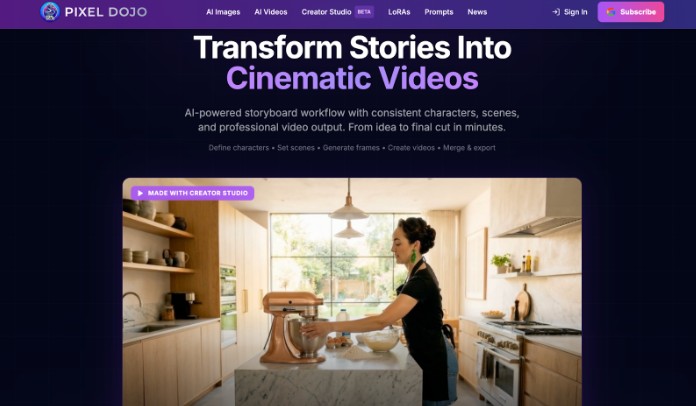
Pixel Dojo is another service that features text-to-video and image-to-video generation capabilities.
Master Detailed Prompt Engineering
For optimal results, high-quality prompts should include a cinematic level of detail, including the subject, action, environment, style, and camera movement, all in one short sentence.
Such as a close-up of two hands assembling a device in warm studio light, with a slow zoom and a shallow depth of field.
Technical parameters such as frame rate, aspect ratio, or mood lighting can be important to achieve a professional-grade product.
For example, prompting with fewer than 100 words can yield more consistent results without overloading the model.
This also makes generating footage faster and more realistic.
Key Elements of Strong Prompts
Include elements like subject, action, setting, light, and movement.
Use adjectives like “ethereal fog-shrouded forest at dawn” to add atmosphere.
To influence the viewpoint, specify camera angles like dolly shots or overhead drones.
Its lyrics are inspired by film noir, and tests replaced portions out of context to create abstract concepts, while also increasing order and detail.
Tailor Content for Target Platforms
Platform-specific videos are short or long-form versions optimized for social media or long-form platforms.
Short-form videos are vertical, 15-60 second clips with fast cuts and trending sound hooks or music.
Successful longer formats use horizontal ratios, narrative structure, and educational hooks to maintain audience attention.
Prompt each platform (subtitles if silent, square crops for ads) so creators can achieve higher engagement with videos that match native formats without post-crop reflows that produce distortion or affect engagement.
Vertical vs. Horizontal Optimization
Verticals should remain within the central frame to be suitable for scrolling on mobile, while horizontals are ideal for story-heavy shots with large vistas.
Always preview renders in target aspect ratios for framing issues.
Pursue Iterative Refinement Cycles
For an iteration, it is similar to sketching drafts for progressive enhancement.
You produce the video, check what is wrong (e.g., still images, speed of actions), and then modify the prompts step by step (e.g., lighting, transitions) to generate the next generation.
It requires 3-5 cycles in order to obtain a polished result.
With manual edits like text overlays and aligning audio, batch production can yield variations from which selections can be made, vastly increasing the possibilities.
This refines amateur efforts to the quality used for broadcasting.
Harness Reference Images Effectively
Static references act as anchors to the videos, establishing the style and character present.
Images of desired styles, colors, and compositions can lead the AI in the right direction.
This avoids drift, ensuring a consistent brand across various clips.
For key frames, use stills first. This is efficient and lets you fine-tune prompts.
Starting with multiple variations for the first frame aids smoother motion throughout the video.
The technique is a hybrid, producing hyper-realistic results.
Enhance Audio and Voice Integration
Add human-like audio to your AI video with multilingual options, tone variations, or emotional highlights to match the video’s intent with on-screen content.
It includes over 50 languages, making a dub unnecessary.
Finally, the addition of sound effects and background music helps to give the game a certain atmosphere, and, when carefully mixed, it helps the sound effects to not to distract from the game.
Voiceover Best Practices
Voice actors should match character demographics, and subtle ambient sounds should not interfere with dialogue.
Manually synchronize the lip movements if out of sync.
Optimize Visual Quality and Motion
Post-processing (upscaling, denoising, and stabilization) provides a more polished output.
Targeting prompts to particular portions of a video allows for adjustments such as color grading, sharpness enhancements, and stabilization to be applied selectively.
Long videos can be subdivided to allow greater detail.

With motion tracking, AI layers can be combined with physics-aware motion, allowing for high-quality results even when working with lower-quality footage.
Maintain Brand and Style Consistency
For consistency between batches, templates and style guides are needed.
Define palettes, fonts, and motifs in initial prompts using references.
Automate logo and theme application for scalable production efficiency.
Human oversight finalizes resonant emotions and planned perspectives that result in recognizable, distinct identities, avoiding the cold stylization of an AI.
Scalability enables high-volume campaigns without sacrificing quality.
Navigate Common AI Limitations Strategically
Knowing its limitations like facial consistency and fast transitions, focus prompts on stable aspects, and avoid actions that go against physics and too much text.
Breaking down into simpler scenes can help with coherence.
By vetting generations, e.g., via previews, and feeding the feedback back to subsequent generations, and by controlling the search, we can maximize the strengths.
Handling Artifacts
Artifacts like flickering lights or endlessly changing faces can be regenerated from simplified prompts, or inpainted to retain most features.
Scale Production with Hybrid Workflows
Create massive amounts of writing from an AI before humans edit it to perfection.
Automate drafts and create assets in bulk to spend more time on the story.
This leads to faster turnarounds.
Multi-modal input like text-plus-image, as well as tuning and iteration, make it more accessible to creators, ushering pro-level video applications to more users.
By combining these techniques, producers can create bespoke AI videos and can discover ways to get the best results through experimentation.